


Connect your Shopify store
Add your store URL and securely link Shopify to your free Interparcel account.


Connect Shopify to Interparcel to import orders, compare couriers, show live delivery choices and return fulfilment updates from one free shipping platform.
5.0 Shopify App Store

 Shopify connected
A faster route from sale to shipment
Link your store once, then turn each new order into a booked and fulfilled delivery without repeating the same admin.
Add your store URL and securely link Shopify to your free Interparcel account.
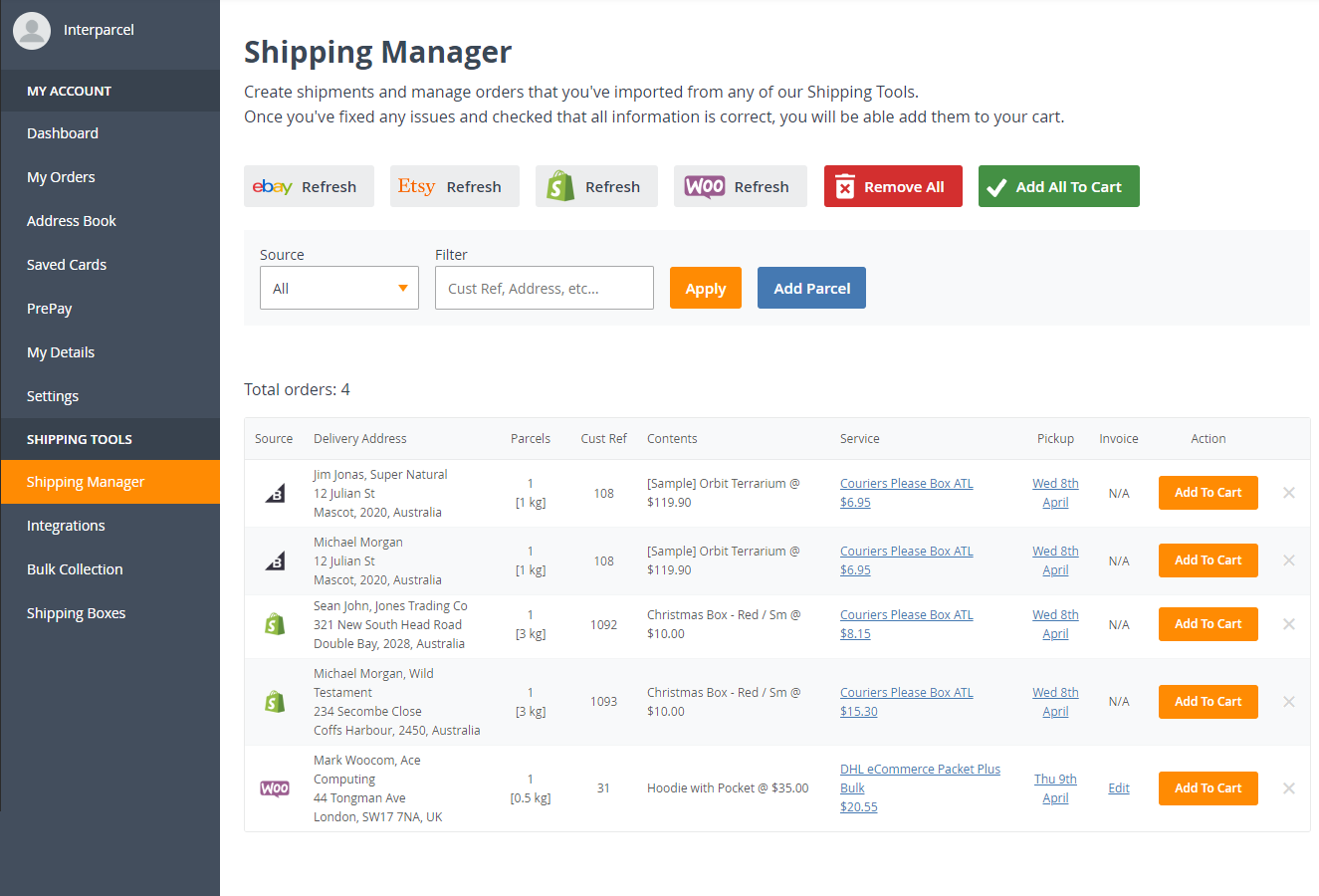
Import Shopify customer, address and order details into Shipping Manager ready for processing.
Choose a courier, create labels and dispatch. Shopify is marked as fulfilled with tracking added automatically.
Real-time shipping quotes
Give customers current domestic and international delivery choices while they buy. The rate displayed at checkout is the rate you pay, with the presentation controlled by you.
Example layout. Available services and rates are calculated for each checkout.
Built for busy Shopify stores
Give each Shopify order the right balance of cost, speed and support, whether it is heading across town or around the world.
Shipping Manager is free for Interparcel customers, with no subscription or per-order platform fees.
£0Reach Shopify customers in more than 200 countries and territories with a choice of economy and express services.
Tracking details are returned to Shopify after fulfilment, helping customers follow their delivery.
When you need a hand, speak with our experienced UK-based customer service team by phone, email or live chat.
One connection, more capability
Join checkout and fulfilment in one organised flow, with the shipping controls a growing Shopify store needs.
Bring new orders and delivery details into Shipping Manager without re-keying information.
Show current domestic and international shipping choices while customers complete their order.
Compare prices, delivery speeds and service options from trusted courier providers.
Book multiple parcels and print labels together to keep busy dispatch days moving.
Use Rule Manager to apply delivery preferences based on your own shipping criteria.
Return fulfilment and tracking details to Shopify once an order has been dispatched.
Smart Boxing works out how items from the same Shopify order can fit across your saved box sizes before you book. It suggests an efficient parcel combination, helping you reduce unnecessary packages, speed up packing decisions and avoid paying for more consignments than you need. Your team can review the recommendation and adjust it whenever an order needs a different setup.
Advanced Shipping Manager
Keep orders, address checks, courier options and labels together so your team can move from paid to dispatched with fewer steps.
More delivery choice
Compare UK and international services, then match each Shopify order with the right balance of price, speed and delivery experience.




















“I have used Interparcel for business for over four years now. The team is great, and I know I am always going to reach someone locally.”
Shopify shipping FAQ
Find out how live rates, order imports and fulfilment work with your Shopify store.
Contact usIt connects Shopify with Interparcel Shipping Manager so you can import orders, compare couriers, book deliveries and send fulfilment and tracking details back to your store. It can also show multi-courier delivery rates at checkout.
Yes. The integration can calculate domestic and international shipping choices during checkout. You can choose which services appear, rename them, control transit-time visibility and add handling charges.
Orders are imported into Shipping Manager for validation and booking. After you create the label, the order can be marked as fulfilled in Shopify and its tracking information returned automatically.
Yes. You can compare international economy and express services and offer live checkout quotes for supported destinations, with delivery available to more than 200 countries and territories.
Interparcel Shipping Manager and the Shopify integration are free to use. There is no subscription or usage fee; you pay for the delivery services you book.
Bring orders from your favourite ecommerce platforms into one streamlined workflow.
Ready when you are
Set up your store connection, choose how delivery appears to customers and start processing orders from one free workspace.


 Facebook
 Twitter
 Instagram
 Linked In
 YouTube